The Easiest Book Club Scheduler
Stop chasing replies across texts and DMs. Create one event, share one link, and see when your book club is free at a glance.
- Share one link with the whole group
- See the best meeting times instantly
- Free to use with no sign-up required
Why this is hard to schedule
Book clubs sound simple until it is time to actually pick a date.
One person prefers weeknights. Someone else can only do Sundays. A few members reply right away, while others see the message three days later and answer in a different thread. Before long, the organizer is scrolling through texts, trying to compare half-answers, maybes, and last-minute conflicts.
Book club scheduling also has its own rhythm. Meetings are recurring, but not always on a perfect pattern. Some months people travel. Some books run long. Sometimes the group wants a longer discussion over dinner, and sometimes it is a quick catch-up at a coffee shop. The challenge is not just finding any time. It is finding a time that works for enough people to keep the club active and enjoyable.
That is where a simple book club scheduler helps. Instead of collecting availability manually, you can give everyone one clear place to respond.
How WhenItWorks helps
WhenItWorks gives your group an easy way to settle on a book club date without the usual back-and-forth.
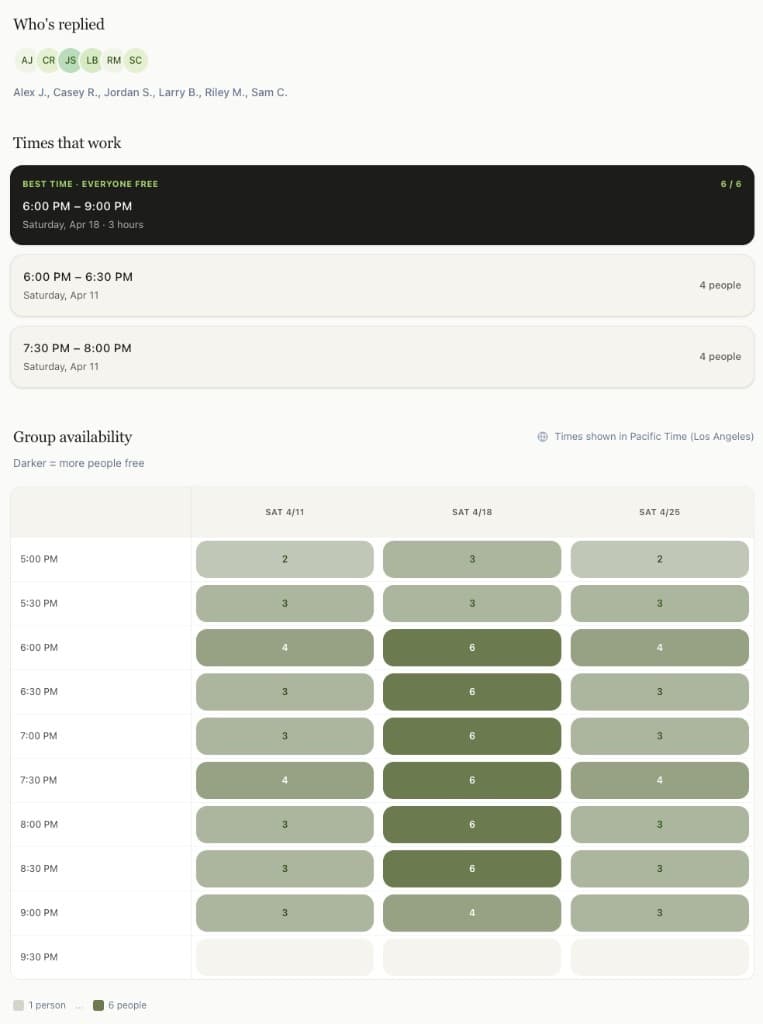
You create an event with possible times, share one link with the club, and everyone marks when they are available. The availability heat map makes it easy to spot overlap, and the best times are highlighted so you do not have to guess. Instead of piecing together replies from multiple chats, you get one clear view of what works.
It fits book clubs especially well because it stays lightweight. Your group does not need to download anything complicated, sync calendars, or create accounts just to answer a simple scheduling question. It is free to use, fast to set up, and easy for everyone to understand.
How it works for this use case
See how it works end-to-end, or follow these steps to get started.
- 1
Create your book club event
Add a title, such as "April Book Club Meeting," and list the dates and times your group could meet.
- 2
Share the event link
Send the link in your group chat, email thread, or club message board so everyone has one place to respond.
- 3
Members mark their availability
Each person selects the times that work for them. No sign-up is required, which helps remove friction and get faster responses.
- 4
Review the availability heat map
See which time slots have the most overlap and which options are strongest for the group.
- 5
Pick the best meeting time
Use the highlighted best times to choose the winner and move the club forward without another round of messages.
Key benefits
Less group chat clutter
Book club planning often gets buried under side conversations about the book, snacks, location, and life updates. A dedicated event link keeps scheduling separate, so the group can keep chatting without losing the actual planning details.
Easier for casual groups to use
Not every book club wants another app, login, or complicated setup. WhenItWorks keeps things simple, which is ideal for friend groups, neighborhood clubs, and informal reading circles.
Helps you find the strongest turnout
Sometimes the goal is not finding a time that works for every single person. It is finding the option that gives the club the best chance of a good discussion. The heat map and best-time highlighting make that much easier.
Good for recurring monthly planning
Many book clubs meet regularly but still need flexibility from month to month. This works well when the group usually meets around the same time but needs to adjust for holidays, school events, travel, or changing routines.
Faster replies with less friction
The more steps people have to take, the more likely they are to put it off. A free tool with no sign-up required makes it easier for members to respond quickly.
More confidence for the organizer
Organizing a book club can feel awkward when you have to keep nudging people or make a judgment call based on scattered replies. With one clear view of availability, it is easier to choose a time and feel sure it was the best option.
Real-life example
Maya runs a small book club with eight friends. At the end of each meeting, everyone says they want to meet again next month, but choosing a date always turns into a long text thread. Some members reply right away, others respond later, and a few forget entirely.
For the next meeting, Maya creates a WhenItWorks event with six possible time slots across two weeks and drops the link into the group chat. Over the next day, everyone marks what works for them. Maya checks the availability heat map, sees that one Thursday evening has the strongest overlap, and picks it. The group gets a clear answer without the usual scheduling mess.
Who it's great for
- Friend-run book clubs
- Neighborhood reading groups
- Library-adjacent informal clubs
- Monthly fiction or nonfiction discussion groups
- Small community clubs that coordinate over text or email
- Groups that want a free, low-friction way to schedule meetings
Frequently asked questions
Yes. You can create an event and share it with your group for free.
No. Members can mark their availability without creating an account, which makes it easier to get responses from the whole group.
Yes. It works well for monthly or recurring book club meetings, especially when your exact meeting date changes from month to month.
WhenItWorks shows an availability heat map and highlights the strongest options, so you can quickly see which times work for the most people.
For most groups, yes. Group chats are fine for discussion, but they get messy when you are comparing multiple date options. A dedicated scheduling link gives you a much clearer view.
Yes. It works for both. You can use it whether your group meets at someone's home, a café, a library, or online.
It works especially well for small to medium groups, including friend groups and casual clubs that want a simple way to pick a time.
Related pages
Make your next book club meeting easier to schedule
Skip the message pile-up and give your group one simple place to respond. Create a free event, share the link, and find the best time faster.
More Ways to Use WhenItWorks
Plan group events, dinners, trips, and meetups with the same simple scheduling tool.