Doodle used to be the obvious answer for "how do we find a time that works for everyone?" Create a poll, share a link, pick the slot with the most votes. Simple enough. But if you're now looking for a Doodle alternative, the reason is usually the free tier changes — one poll at a time, ads on every page, and persistent nudges to upgrade — that add more friction for casual personal scheduling.
If you're trying to coordinate a birthday dinner, a book club, a game night, or a family gathering, you don't need a business scheduling platform. You need something fast, free, and easy enough that your group will actually use it.
What's changed with Doodle's free plan
Doodle remains useful for professional contexts — it integrates with Google Calendar and Outlook, supports team workflows, and has a polished interface. But the free version in 2026 has real limitations for personal use:
- Ads displayed to all participants, including your guests
- Constant prompts to upgrade within the scheduling flow
- Calendar integration and meeting reminders locked to paid plans
- Account required to create polls (guests don't need one, but you do)
For teams that need calendar sync, Zoom integration, or recurring booking pages, Doodle Pro makes sense. For a friend group trying to pick a Saturday night, it's overkill — and the free version makes it feel that way.
The core difference: polls vs. availability grids
Before comparing tools, it's worth understanding the two main approaches to group scheduling, because they solve slightly different problems.
Polling tools (like Doodle) ask you to propose specific times upfront. Everyone votes yes, no, or maybe on each option. This works well when you already have a shortlist of candidate times and just need to confirm which one has the most support.
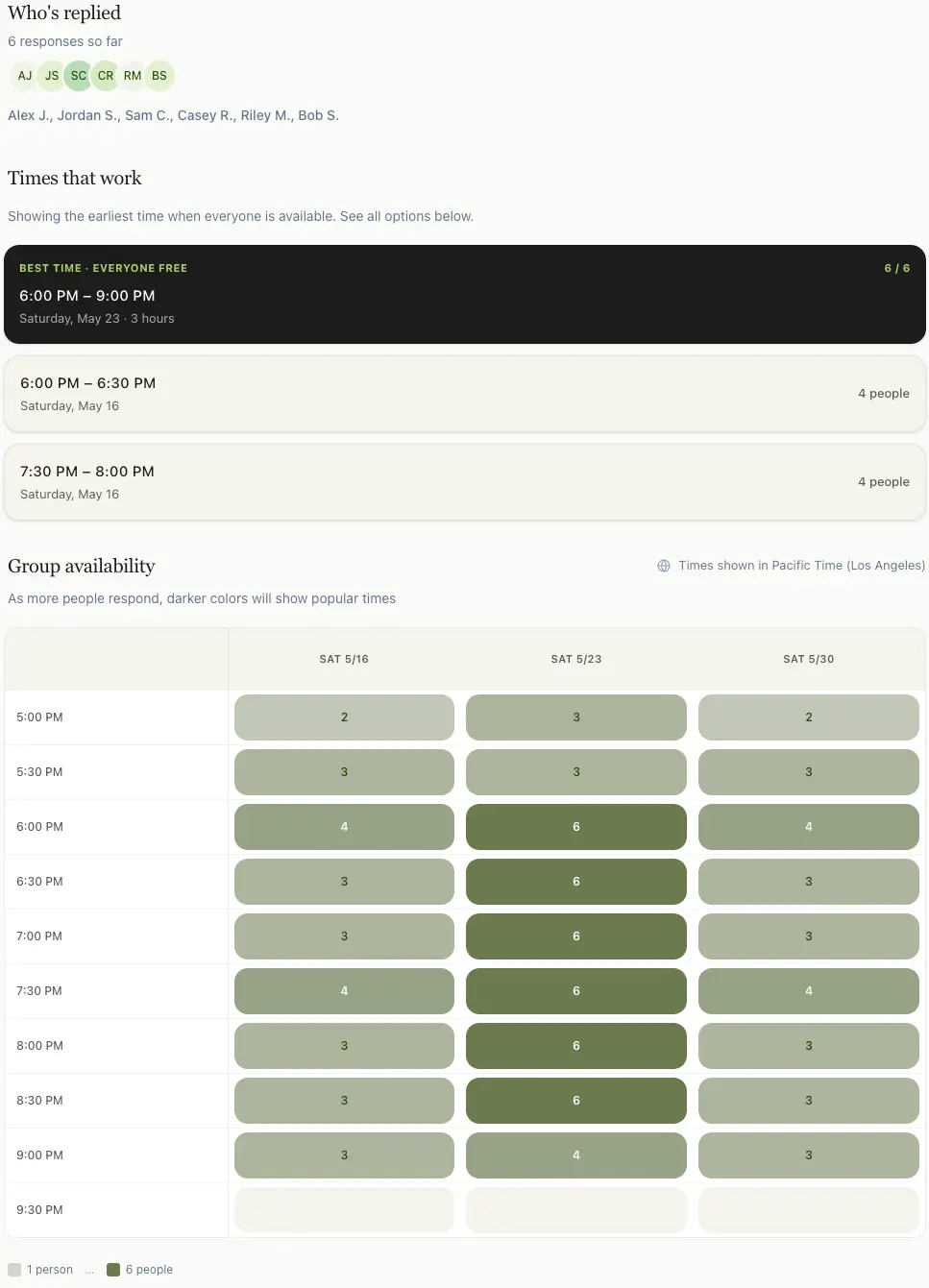
Availability grid tools(like WhenItWorks and When2Meet) let everyone paint their free time across a range of dates and time slots. You don't need to guess upfront — the best overlap surfaces automatically from the responses. This approach is generally better when you don't already know which times to propose, which is most casual group scheduling situations.
The practical difference: With a poll, you might propose Friday 7pm and Saturday 6pm — but what if Saturday 4pm actually works for everyone and you never asked? An availability grid removes that blind spot.
WhenItWorks as a Doodle alternative: feature-by-feature comparison
WhenItWorks is built specifically for casual group scheduling — friend groups, families, and small teams who want a fast answer without friction. Here's how it stacks up:
| Feature | WhenItWorks | Doodle (free) | Doodle (paid) |
|---|---|---|---|
| Price | Free forever | Free (limited) | From $6.95/mo |
| Account required to create | No | Yes | Yes |
| Account required to participate | No | No | No |
| Scheduling approach | Availability grid | Polling | Polling |
| Live availability heatmap | Yes | No | No |
| Best-time highlighting | Yes, automatic | Basic | Basic |
| Finalize / confirm selected time | Yes — one-click finalize | No — results only | No — results only |
| Ads shown to guests | No ads | Yes | No |
| Calendar integration | No | Paid only | Yes |
| Best for | Friend groups, families, casual events | Light personal use | Teams, professional meetings |
When WhenItWorks is the better choice
WhenItWorks is the right fit when:
- You're organizing a casual event — dinner, hangout, game night, gathering
- You don't know which times to propose yet and want to see what works
- You want zero friction for guests (no downloads, no accounts, just open the link)
- You want to run multiple events at the same time without limits
- You'd rather not have ads shown to the friends and family you're inviting
- You need something that works in under a minute, not a scheduling workflow
Try it — it takes about 60 seconds
Create an event, share the link with your group, and see the best time emerge automatically. Free, no account needed.
Create your first event →Free forever · No sign-up required · Works on any device
Closing the scheduling loop
Polling tools including Doodle share a common gap: they show you the results, but they don't help you commit to the decision. After everyone votes, you still need to send a follow-up message — in the group chat, via email, in a Slack thread — saying "okay, we're going with Thursday at 7pm."
WhenItWorks adds a Finalize step that closes this loop. Once responses are in and the best time is clear, the organizer can mark it as confirmed with one click. Participants who revisit the event link see the finalized time prominently displayed, not just the heatmap. The scheduling journey completes inside the tool: from "when is everyone free?" to "here's our confirmed time."
Why this matters:The gap between "here are the votes" and "this is what we're doing" is where casual group scheduling often breaks down. Someone needs to make the call and communicate it. Half the group sees the message, half doesn't. People ask again later because they forgot or weren't sure if it was final. The Finalize feature makes the decision official and visible in the same place where availability was collected.
For professional contexts where you're using Doodle Pro with calendar sync and automated notifications, this gap is less critical — the tool handles the confirmation workflow. For casual friend groups, families, and informal teams using free tools, it's the difference between "we probably said Thursday?" and "Thursday at 7pm is confirmed, click the link to see it."
When Doodle is still the right call
To be fair: Doodle Pro is a genuinely solid product for professional scheduling. It makes more sense when you need:
- Calendar sync (Google Calendar or Outlook) to auto-show your availability
- Meeting reminders sent automatically to participants
- Booking pages for 1:1 appointments (like a Calendly-style link)
- Team scheduling with multiple hosts and shared admin
- Integration with Zoom or Google Meet to auto-create video call links
If you're running a business, managing client calls, or scheduling recurring team meetings, those features are worth paying for. WhenItWorks doesn't try to be a Calendly replacement — it's focused entirely on the "pick a time for this group event" problem and does that one thing well.
Other free Doodle alternatives worth knowing
When2Meetis the classic free option and still works well for groups that are already familiar with it. It's best at giving you a quick, no-frills availability grid that anyone can use without creating an account. The downside is usability: the interface is dated, and the mobile experience can feel awkward for first-time participants. It's reliable and genuinely free, but many groups prefer a newer UI when they want faster completion rates.
Crab.fitis another modern availability-grid tool with a clean visual design and no account requirement. It's best when you want a simple, polished scheduling flow that feels modern out of the box. In practice, some groups find the feature set a bit lighter around decision-closing workflows, so the organizer may still need to confirm the final time manually outside the tool. It's a solid option to compare side by side if your group cares mostly about interface and ease of use.
Ralllytakes a polling approach (closer to Doodle's model) and is open-source, which appeals to users who value transparency and flexibility. It's best for situations where you already have a shortlist of candidate times and want straightforward yes/no voting. The tradeoff is that polling can miss good time slots you didn't propose upfront, which is where availability-grid tools are usually stronger. If your group likes a ballot-style workflow, Rallly is a balanced and credible free choice.
The bottom line
If you're scheduling a professional meeting and need calendar sync, reminders, and integrations — Doodle Pro or Calendly are worth the money. But if you're trying to get seven friends to agree on a dinner date, you don't need all that. You need something free, fast, and easy enough that everyone actually uses it.
WhenItWorks is built for that second case. No account, no ads, no upsells. Create an event, share a link, see the best time. Done.
Frequently asked questions
What is the best free Doodle alternative?
WhenItWorks is a strong free Doodle alternative for casual group scheduling. It's completely free, requires no account to create or participate in an event, shows a live availability heatmap, and has no ads. It's ideal for friend groups, families, and small teams. When2Meet is another reliable free option with a more dated interface.
Is Doodle still free in 2026?
Doodle still has a free tier, but it's significantly limited. The free plan only allows one active poll at a time, shows ads to all participants, and locks features like calendar sync and reminders behind a paid plan. For casual personal scheduling, the limitations make it feel more friction-heavy than it used to be.
Do I need an account to use WhenItWorks?
No. Neither organizers nor participants need to create an account. You create an event, share one link, and everyone marks their availability by entering just their name. No passwords, no downloads, no sign-up required.
What's the difference between Doodle and WhenItWorks?
Doodle uses a polling model — you propose specific times and people vote yes or no. WhenItWorks uses an availability grid — everyone marks their free time across a range of dates, and the best overlap surfaces automatically. The grid approach works better when you don't already know which specific times to propose.
Can I use WhenItWorks for recurring group events like a book club?
Yes. You can create a new event each time your group needs to schedule a meeting — there's no limit on events. Many book clubs, game nights, and recurring friend groups use it to find the next date each time without the group chat chaos.